Skip to content
Private by design · Android

Know where your
money goes.

Capture a purchase the moment it happens. Savio turns a private, on-device ledger into a clear answer to the question that matters: what can I safely spend?
Coming soon to Google PlaySee the whole product
  • No account
  • Works offline
  • Your data stays local
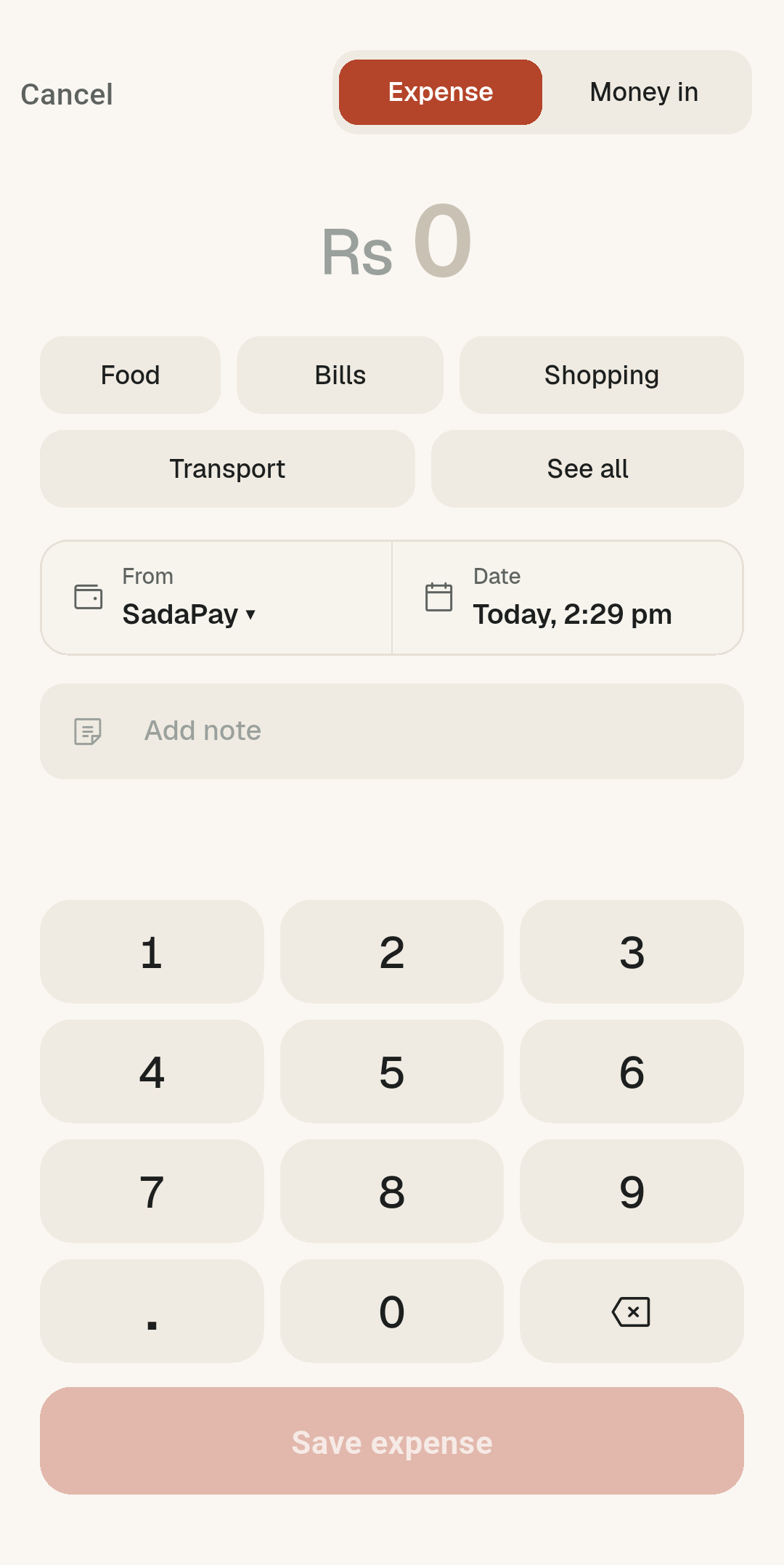
Savio Quick Add screen for entering an expense
HOME WIDGET
Safe to spend$1,284
Until 01 DecUpdated now
Savionow

Quick add

+ Expense+ Income
01

Capture the moment

BUILT FOR THE MOMENT

Before the receipt
leaves your hand.

The fastest expense is the one you do not need to remember later. Savio puts Quick Add wherever your thumb already is.

01

Home widget

Log from your home screen.

02

Quick Settings

One tile in the shade.

03

Quick Add

Amount, category, done.

No app hunting required
04

Pinned notification

Expense and income, ready.

05

App shortcuts

Long-press and log.

THE WHOLE PICTURE

One private ledger.
Five clear views.

From the first tap to the month-end pattern, every part of Savio has one job: make your money easier to understand. Scroll to see it in action.

01 · QUICK ADD

Before the receipt
leaves your hand.

Amount, category, wallet, done. Quick Add is built for the moment right after you pay, not an end-of-day chore.

  • Smart category shortcuts
  • Any wallet, any currency
  • One tap to save
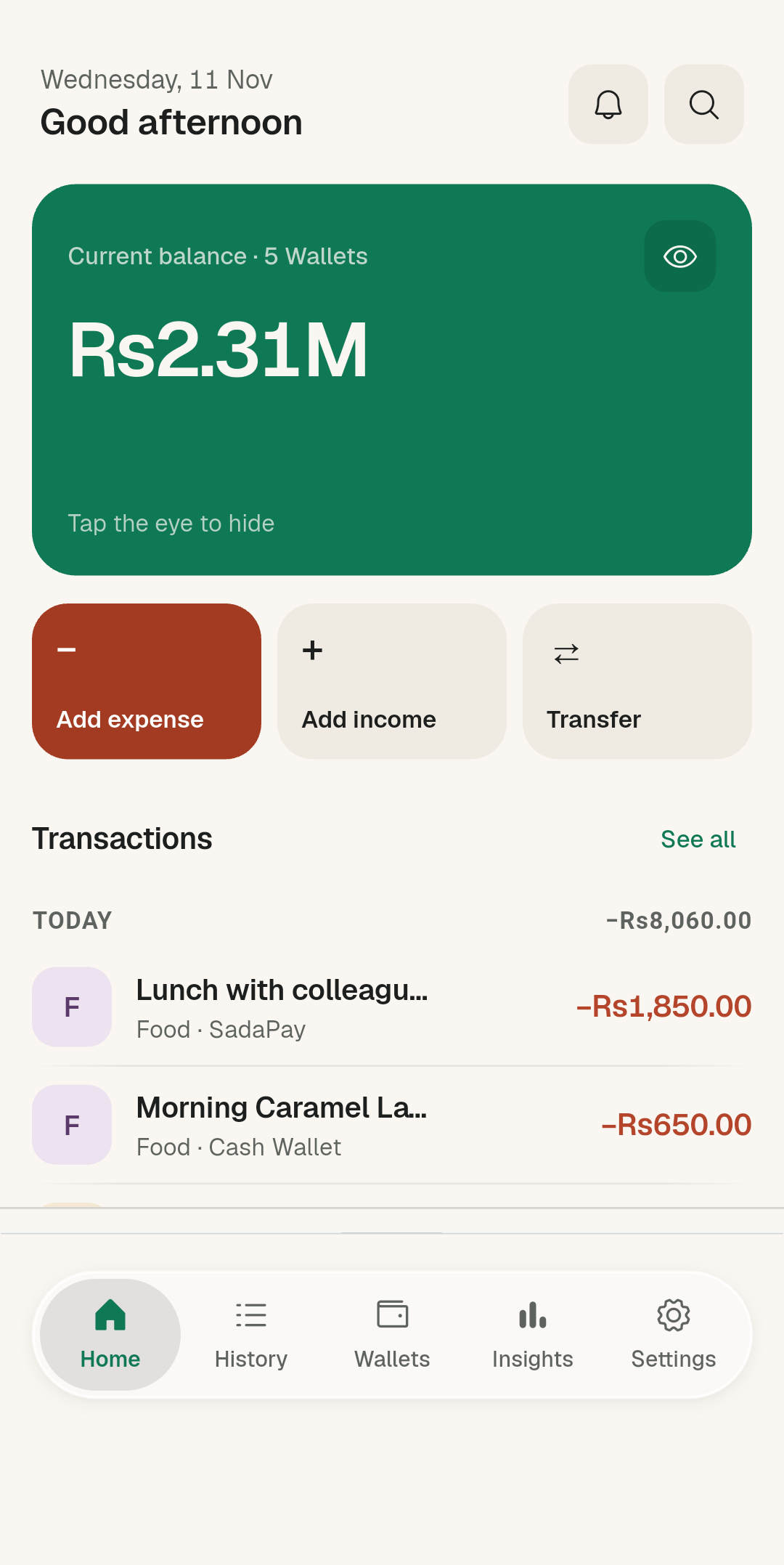
02 · DASHBOARD

Start with where
you stand.

Your current balance, the actions you use most, and recent activity—without turning your home screen into a report.

  • Combined balance at a glance
  • Recent transactions in context
  • Quick actions stay within reach
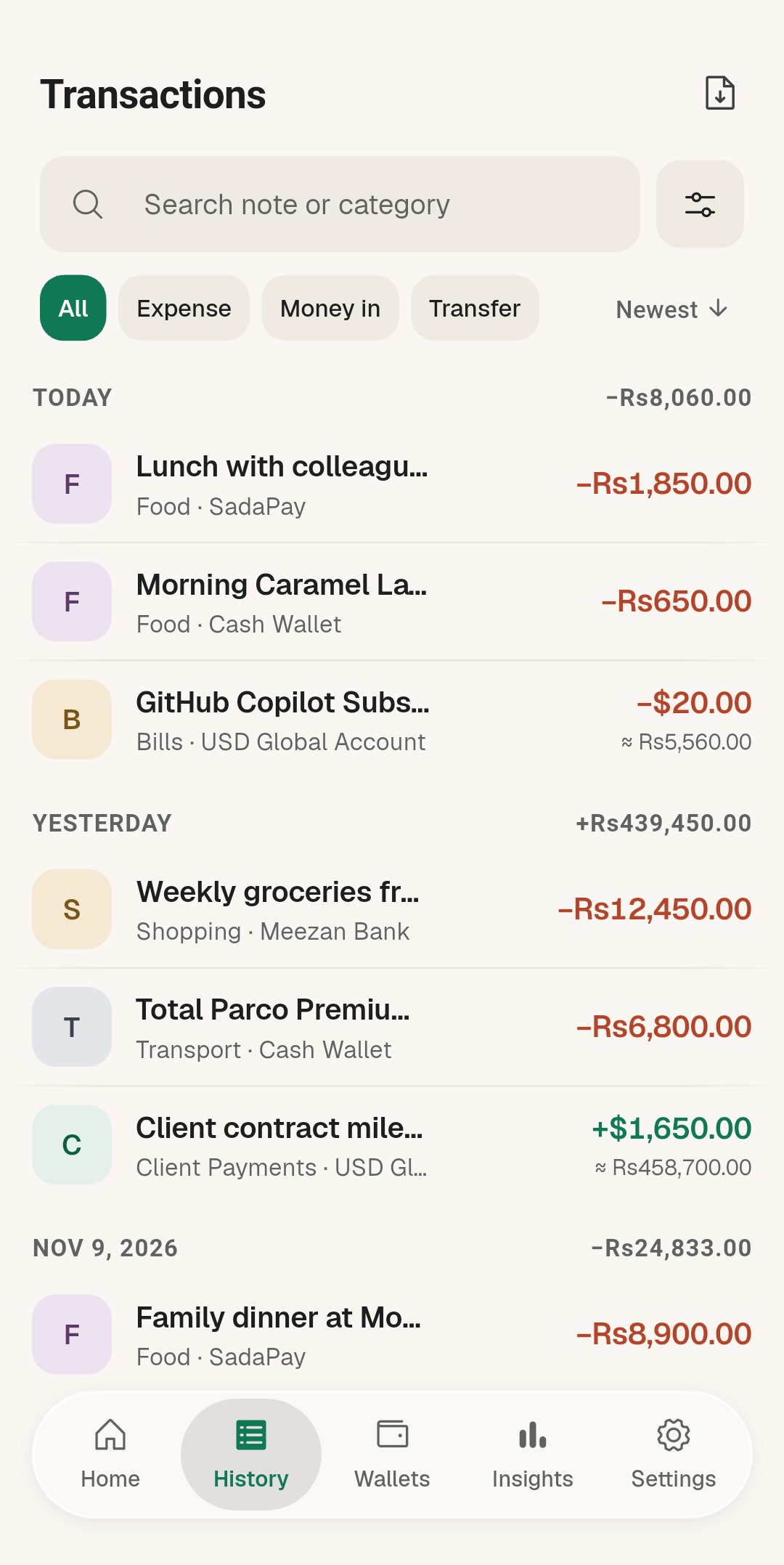
03 · TRANSACTIONS

Every entry, easy
to find.

Browse a day-grouped ledger, search it, or filter it. Each expense remains neutral—information, not an alarm.

  • Search and focused filters
  • Original currency preserved
  • Clear source and note details
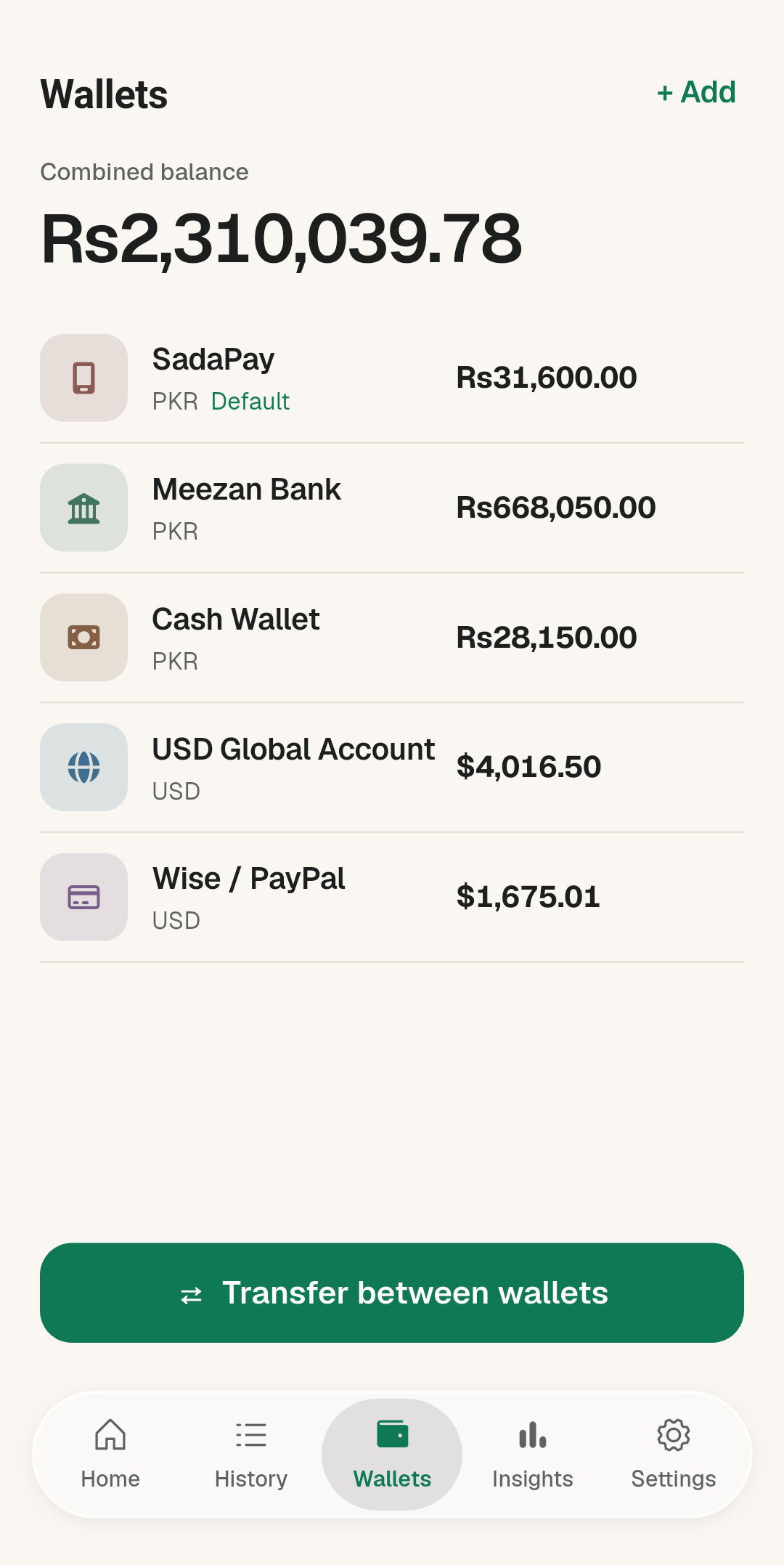
04 · WALLETS

Your money has
more than one home.

Keep bank accounts, digital wallets, and cash separate while still seeing the total. Every past entry keeps the amount you typed.

  • Multiple wallets and currencies
  • Transfers between matching currencies
  • Choose a main wallet
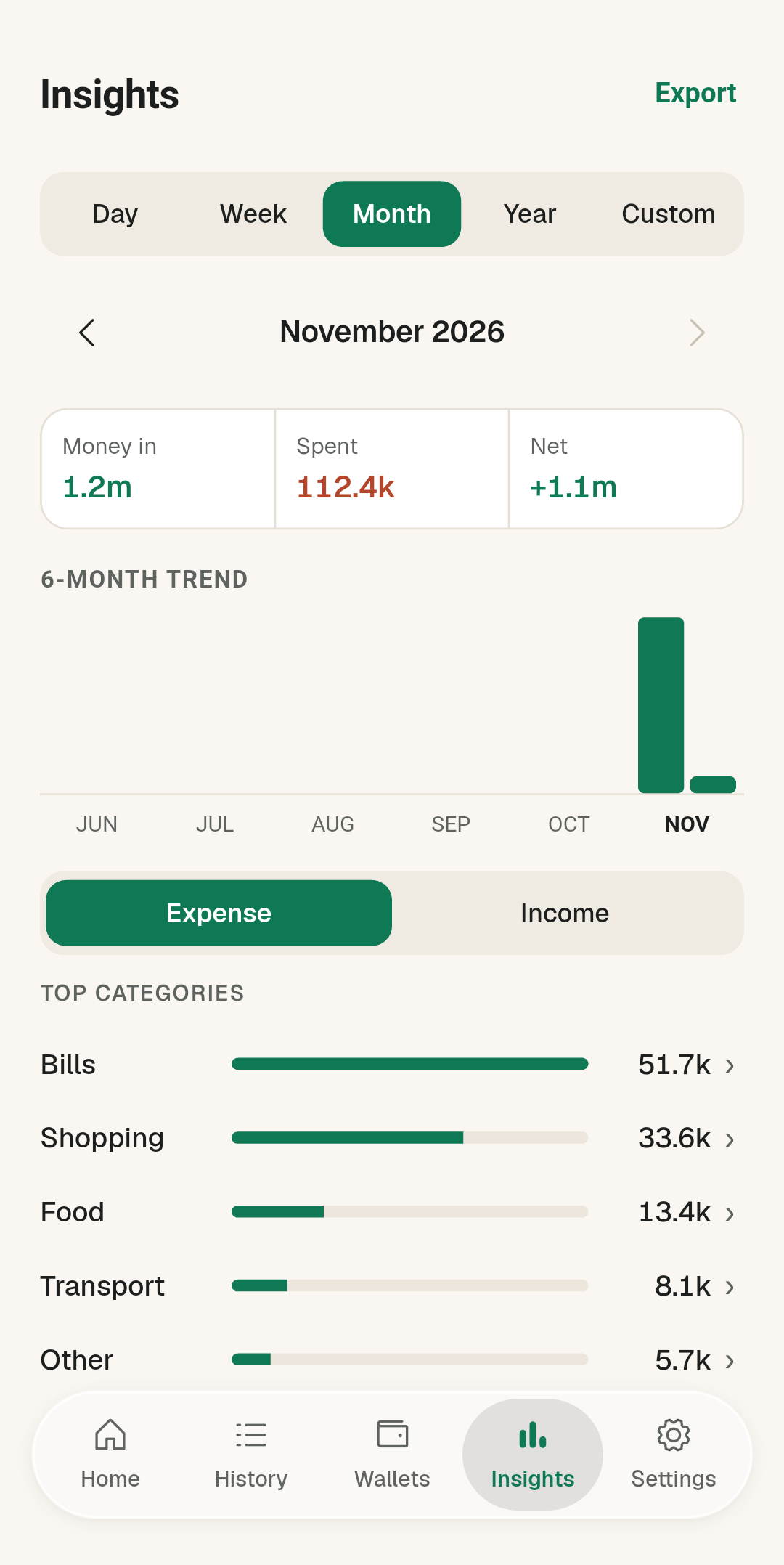
05 · INSIGHTS

Patterns, without
the noise.

See the shape of a month, where spending concentrates, and how the current pace compares. Space is reserved for the chart; the rest stays calm.
  • Category breakdowns
  • Monthly spending trend
  • Recurring charges in view
Savio Quick Add sheet for entering an expenseSavio dashboard showing current balance and recent activitySavio transactions list grouped by daySavio wallets screen with combined balanceSavio insights screen with spending trend and categories
THE QUESTION BEHIND THE NUMBERS

Can I afford
this?

Safe to Spend turns a balance into a useful answer. Savio considers what you have, upcoming recurring charges, and the time left in your period—then shows the amount that is actually uncommitted.

AVAILABLE−UPCOMING=SAFE
SAFE TO SPENDLIVE
$1,284.20

Until 01 December

AVAILABLE$1,740.20
UPCOMING−$456.00
Those headphones?They fit.Your planned charges stay covered.
BOTH THEMES, ALWAYS

Clear in daylight.
Calm after dark.

Savio’s Nocturne system keeps the same hierarchy in both modes: precise type, quiet borders, and color used only when it means something.

LIGHT
OverviewNovember
CURRENT BALANCE$21,003.00Across 3 wallets
☕Cold brewCoffee · Today−$5.00
◇GroceriesFood · Yesterday−$32.40
DARK
OverviewNovember
CURRENT BALANCE$21,003.00Across 3 wallets
☕Cold brewCoffee · Today−$5.00
◇GroceriesFood · Yesterday−$32.40
ON-DEVICE DATABASENO CLOUD LEDGERWORKS OFFLINE
THE PHONE IS THE SERVER

Your spending is
your business.

Savio does not need an account, a login, or a cloud ledger. Your financial records live in a local database on your phone, and the core ledger keeps working without a connection.

01

No account to createOpen the app and start tracking.

02

No financial cloud syncYour ledger is not stored on a Savio server.

03

Offline-first by defaultCapture and browse even when the network cannot help.

Read the full privacy policy
QUESTIONS, ANSWERED

The practical
details.

Everything you need to know before making Savio part of the way you track money.

Does Savio need an account?
No. There is no sign-up or login. Savio opens into a local ledger on your Android phone.
Does it work without internet?
Yes. Adding, browsing, and analysing your ledger are designed to work offline. Optional services such as Play Store updates naturally need a connection.
Can I track more than one wallet or currency?
Yes. Savio supports multiple bank accounts, digital wallets, and cash, with a currency assigned to each wallet. Original transaction amounts are preserved.
How can I add an expense quickly?
Use in-app Quick Add, a home-screen widget, the Quick Settings tile, the pinned notification, or an app-icon shortcut.
Is Savio available on iPhone?
Savio is currently built for Android.

Spend with context.
Not guesswork.

A private ledger. Faster capture. A clearer answer.

Coming soon to Google PlayOpens the Google Play listing